NFC: Near Field Communication Explained for Real Life
NFC is the kind of technology you might use every day without thinking about it. A quick tap at a checkout terminal, a phone held near a transit gate, a badge waved at an office door, or a small sticker that opens a web page—these are all common experiences powered by NFC. Because it feels effortless, people often assume it’s complicated or mysterious. In reality, NFC is built around one simple idea: very short‑range wireless communication that’s meant to be fast, intentional, and easy to repeat.
This guide is written for humans, not engineers. It explains what near field communication is, what NFC technology does well, how it’s different from other wireless tools, and how to use it safely. If you searched for nfc meaning, nfc full form, or “near field communication nfc,” you’re in the right place.
What is NFC, in one clear sentence
NFC (Near Field Communication) is a short‑range wireless technology that lets two devices exchange small amounts of information when they’re extremely close—usually a few centimeters—so you can tap to pay, tap to share, tap to verify, or tap to trigger an action.
That’s it. That’s the heart of it. Everything else is just details and use cases.
NFC meaning: why the “near” part is the whole point
When people ask about nfc meaning, they’re often trying to understand whether NFC is like Wi‑Fi or Bluetooth. The “near” part is what makes NFC different. It is designed to work at very close distance so the interaction feels intentional. You choose to tap. That physical gesture becomes a simple permission signal: “Yes, I want this device to interact with that thing right now.”
This intentional design is why NFC is used for actions where trust matters, like payments, access control, and identity verification. The short range reduces accidental interactions and supports a more predictable user experience.
NFC full form and the formal name
The nfc full form is Near Field Communication. You’ll sometimes see it written as “near field communication NFC” or “near field communication (NFC)” in technical writing. That’s simply the full term paired with the abbreviation so readers learn both.
The phrase “near field communication nfc” can look repetitive, but it’s common in documentation and product descriptions because it helps people connect the name to the acronym.
How near field communication works (without the scary math)
Near field communication uses radio waves at a specific frequency to create a very small communication zone right next to a device. When your phone is close enough to a reader, a tag, or another NFC‑enabled device, they can exchange information using agreed‑upon rules (standards).
If you want a mental model, imagine a tiny handshake. The devices “notice” each other only when close, quickly agree on how to talk, exchange the minimum information needed, and then disconnect. It’s fast because it’s simple. It’s reliable because it’s short. It’s user‑friendly because the physical tap is a clear signal.
You do not need internet for NFC to function as a local interaction. However, some actions triggered by NFC—like opening a website or completing a payment—may require a network connection to finish the larger process.
The three main ways NFC technology is used
NFC technology shows up in three major patterns. Thinking in patterns helps you understand why NFC can feel like a “different feature” depending on what you’re doing.
1) Reading a tag (phone reads, tag responds)
This is the most common everyday use outside of payments. Your phone reads data from a small NFC tag in a sticker, card, poster, or product label. The tag might contain a web link, contact info, a Wi‑Fi setup shortcut, or a small structured message.
Tags are often passive, meaning they have no battery. They receive a tiny amount of energy from the reader device’s NFC field, just enough to send back their stored data.
2) Emulating a card (phone behaves like a card)
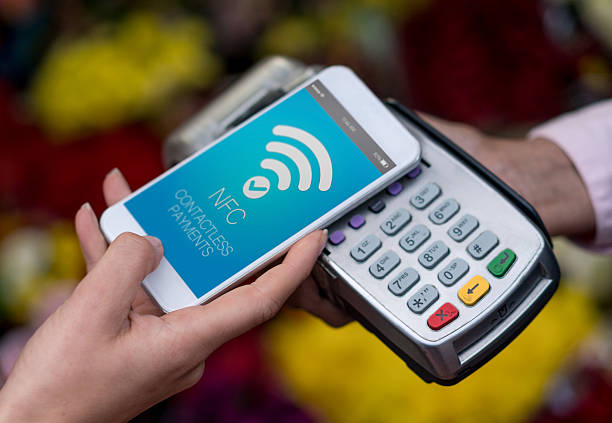
In this pattern, your phone behaves like a contactless card. That’s how mobile wallets and many transit passes work. When you tap your phone to a payment terminal, the terminal “thinks” it’s interacting with a contactless card, even though it’s actually talking to your phone’s secure wallet system.
This mode is powerful because it lets one device represent many cards and credentials, while adding extra security features like biometric confirmation.
3) Device‑to‑device exchange (two devices share briefly)
Sometimes NFC is used to exchange a small piece of information between two active devices, like two phones. Often the shared information is a setup step that then launches a bigger connection over Bluetooth or Wi‑Fi. In that sense, NFC becomes the instant pairing trigger rather than the long‑term data channel.
Where NFC is already in your life
Even if you never opened your phone’s NFC settings, you may be using it regularly.
Contactless payments and “tap to pay”
Tap‑to‑pay is the best‑known NFC experience. You tap your phone or watch on a terminal and the payment goes through quickly. Behind the scenes, modern wallet systems use layered security approaches such as device authentication and tokenization. That means the merchant is usually not receiving your raw card number in a simple readable form for each transaction.
In human terms: you get the convenience of tapping, and the system tries to reduce the exposure of sensitive information.
Public transport and building access
Transit gates, office badges, hotel keys, and membership cards often rely on contactless interactions compatible with NFC readers. The design goal is speed and reliability. When you’re moving through a crowd, a slow system becomes a problem. NFC is built to be fast in these high‑traffic moments.
Quick pairing and “tap to connect”
NFC can reduce friction. Instead of opening settings, searching for a device, and pairing manually, you tap and the pairing process begins. Even when the final connection uses Bluetooth, NFC is the “start” signal that makes the experience smooth.
Smart posters, product labels, and interactive objects
An NFC sticker on a poster can open a page. An NFC tag embedded in a product can launch a guide, confirm authenticity, or register a warranty. The physical object becomes a shortcut to the digital layer.
This is one reason NFC is popular in modern retail and brand experiences. It adds information without adding clutter.
NFC vs Bluetooth vs Wi‑Fi vs QR codes
It’s normal to compare NFC to other technologies, especially when deciding what to use in a project or a business flow.
Bluetooth is best for ongoing connections at a distance, like headphones or car audio. Wi‑Fi is best for networking and high data transfer. QR codes are visual and universal, great for posters and printed materials. NFC is best for intentional tap interactions that feel physical and quick, with very little setup.
A simple rule: if “tap” feels like the natural user action, NFC is often the right choice. If “scan” is easier because it’s printed on a sign, QR codes may be better. If you need a sustained connection for minutes or hours, Bluetooth and Wi‑Fi are usually the right tools.
NFC and trust: why short range can be a feature, not a limitation
The short range of near field communication is often misunderstood as a weakness. In practice, it’s one of the reasons NFC works so well for high‑trust interactions. The user is present. The user is close. The user performs a deliberate gesture.
That closeness also helps reduce accidental triggers. You don’t typically “pay by mistake” because you walked past a terminal. You generally need to bring your phone right to it, and many systems require confirmation through biometrics, passcode, or device unlock.
NFC isn’t magically immune to risk, but its “near” design naturally supports intentional action.
NFC and privacy: realistic risks and calm habits
Some people worry that NFC allows strangers to steal data from a distance. This fear is usually bigger than the real risk because NFC requires extremely close proximity. Still, the best approach is not panic; it’s healthy habits.
If you don’t use NFC, turning it off is a reasonable choice. If you do use NFC, keep your phone protected with a lock screen and use wallet settings that require confirmation. Be cautious about tapping unknown tags in public spaces, just as you would be cautious about unknown links.
A good mental model is: NFC can trigger actions. You should trust the things you tap, and you should treat unfamiliar prompts carefully.
How NFC works on phones (and why positioning matters)
Many NFC “failures” are not failures at all; they are simply positioning issues. The NFC antenna in a phone is usually strongest in a specific area. That area differs between models. Some phones read best near the top, some near the middle, some near the back.
If your phone struggles to read an NFC tag, try moving the phone slightly and holding it steady for a moment. The action can be so fast that we assume any position should work, but the field is small and alignment matters.
Phone cases can also interfere, especially thick cases or cases with metal elements. If NFC is inconsistent, remove the case as a test. If the problem disappears, you’ve found the reason.
NFC tags: what they can store and what they can’t
NFC tags are great for small pieces of information, not for large storage. Many tags store a link, a short text message, contact information, or a small structured record. That’s why NFC experiences often open a web page rather than “contain” the content inside the tag.
This can actually be an advantage. A tag that opens a link can always point to an updated page. The physical tag stays the same, but the destination can improve over time.
If you’re building an NFC experience, think of the tag as a doorway, not a library.
Practical uses of NFC tags that feel genuinely helpful
NFC tags become valuable when they reduce steps you repeat often. People use tags for home routines, work routines, and travel routines.
A tag by the front door can open navigation to your most common destination. A tag by your desk can open a focus timer or a meeting link. A tag in a car can open a music app, start a route, or show a checklist. A tag on a device can open a troubleshooting page or warranty info. A tag in an office can open a check‑in page or a help desk form.
These are not “cool tricks.” They’re small conveniences that add up.
NFC in business: customer experience without friction
Businesses adopt NFC because it makes actions faster and clearer. The customer doesn’t want to create an account just to see a menu. They don’t want to search for a support page while standing at a product display. They want the simplest path from intention to outcome.
That’s where near field communication is powerful. It connects the physical moment to the digital result with almost no effort. Tap to open instructions. Tap to verify authenticity. Tap to join a loyalty program. Tap to leave feedback. Tap to pay.
The best business NFC experiences are quiet and respectful. They don’t shout. They simply help the person do what they already wanted to do.
NFC for identity and authenticity
NFC is increasingly used for authenticity checks. Brands can embed NFC tags into products so customers can tap and confirm they’re interacting with official information. This can reduce counterfeits and improve trust.
Done well, this is not surveillance. It’s customer empowerment. The customer can access clear product information, care instructions, warranty details, and guidance that improves the ownership experience.
Near field communication becomes a bridge between physical trust and digital clarity.
Security in NFC payments: what “secure” really means
Payment systems are built to protect users, but “secure” is a word that can hide complexity. A healthy view is: modern systems use multiple layers, and your settings still matter.
Wallet systems typically require device authentication. Many use tokenization so the transaction does not broadcast your raw card details. Terminals and networks follow standards designed to reduce fraud. And importantly, you usually need to bring the phone close, which reduces accidental or remote interaction.
Your role is simple: keep your device locked, keep your wallet protected, and don’t ignore suspicious prompts.
NFC and “unknown tags” in public places
An NFC tag in a public place can be useful, but it can also be misused if someone replaces it or adds another tag near it. The risk is not that the tag can magically “hack” you by touch; the risk is that it can open a link or trigger an action that leads you somewhere unsafe.
Treat NFC tags like links. Before you enter a password or personal data, confirm you’re on a legitimate site. If the destination looks strange, close it. If your phone shows a preview of the destination, take a second to read it.
This is the same calm caution you should use with QR codes and unfamiliar URLs.
Troubleshooting: when NFC won’t read, won’t pay, or won’t connect
If NFC isn’t working, the fix is often simple. First, confirm NFC is enabled in settings if your device has a toggle. Second, restart your phone if the NFC service seems stuck. Third, remove bulky cases and retry. Fourth, adjust positioning and try a slower, steadier tap.
If payments fail repeatedly, also confirm that your wallet is set up correctly, your default payment method is selected, and your device meets any local requirements (some regions require extra verification). If a specific terminal fails but others work, the issue may be the terminal, not your phone.
If a tag fails consistently, the tag may be damaged. Tags can fail due to physical wear, bending, or poor placement on metal surfaces.
NFC in projects: designing tap interactions people actually enjoy
If you’re building something using NFC, the best advice is human, not technical. Design for clarity. Make the tap point obvious. Tell the user what will happen. Avoid surprises. Make the destination page fast, mobile‑friendly, and readable. Respect the user’s time and attention.
The biggest NFC failures are not radio failures. They’re design failures. People tap and don’t understand what happened, or they land on a page that looks untrustworthy, or they get asked for too many steps. NFC is best when it removes steps, not when it adds steps.
A good NFC experience feels like: “That was easy.”
A gentle technical note: why NFC is fast
Without going deep into engineering, it helps to know that NFC is fast because it moves small data at short distance. It is not trying to stream video. It is trying to exchange a short record that can trigger a larger action. That simplicity is why NFC feels instant.
If you want to remember one technical phrase, remember this: NFC is designed for close‑range, quick exchanges. That design choice is why it works so well for taps.
Frequently asked questions about near field communication
Does NFC drain battery
For most modern phones, NFC power impact is small. If NFC is enabled but not actively used, it typically does not consume large power. Battery concerns usually come more from the apps you open and the network tasks they perform after a tap, not from the NFC radio itself.
Can NFC work through a wallet or thick case
Sometimes. Thin materials usually allow NFC. Thick cases, metal layers, and certain card‑holder cases can interfere. If NFC becomes unreliable, test without the case.
Is NFC safe for payments
NFC payments are designed with security layers and typically require user confirmation. The short range also supports intentional action. No system is perfect, but NFC payments are widely used because they are considered strong enough for everyday use when combined with device security.
Is NFC the same as RFID
They are related but not identical. NFC is a specific kind of short‑range communication that builds on certain contactless standards. RFID is a broader term for radio frequency identification, used across many ranges and designs. In everyday conversation, people connect the ideas, but NFC is a more specific tool with a consumer‑friendly “tap” experience.
What should I do if I tapped an unknown tag
If an unknown tag opened a link, close it if it looks suspicious. Do not enter passwords. If you’re concerned, clear browser tabs and consider scanning your device for security issues. Most of the time, the risk is phishing rather than a direct device compromise.
The main takeaway: NFC is a simple idea with wide impact
NFC is not complicated at the level most people need. The nfc full form—Near Field Communication—describes it well: communication that happens only when devices are near. That “near” design makes it useful for moments where intention matters: paying, entering, verifying, pairing, and triggering.
If you came here looking for nfc meaning, for a clearer explanation of near field communication, or for what “near field communication nfc” actually refers to, the answer is reassuringly straightforward. NFC technology is built to make small actions easier. When it’s designed well, it feels natural. When it’s used thoughtfully, it can be both convenient and respectful.
At nfcing.com, the goal is to keep this topic understandable and practical. NFC should make life simpler, not louder. If you’re learning, start with one use case—payments, tags, or access—and build from there. A single good tap experience can teach you more than a hundred buzzwords ever will.
A short history: why NFC became a “tap” standard
Long before smartphones, contactless cards existed for things like building entry and transit. NFC grew out of that world and was shaped to fit consumer devices. The goal was to take proven contactless ideas and make them friendly for phones and everyday products.
That history matters because it explains two things. First, NFC is built on standards and compatibility. It’s not a random feature that every company invented differently; it’s designed so readers, tags, and “tap points” can work together reliably. Second, NFC was created for quick identity and quick confirmation, not for long sessions. The standards prioritize speed, predictable behavior, and a small data exchange that can trigger a larger process.
If you’ve ever wondered why NFC feels more “instant” than other wireless tools, that’s part of the reason. It was designed for high‑confidence, high‑frequency moments—like gates, checkouts, and badges—where a slow interaction would create real problems.
How to tell if your device supports NFC
Many phones support NFC today, but not all. The simplest method is to check your device settings for “NFC,” “Tap & pay,” “Contactless payments,” or “Near Field Communication.” Some Android phones show NFC in the quick settings panel. Some show it under connection settings. On iPhone, NFC is typically present in models that support modern wallet features and tag scanning behaviors, but the settings interface may look different because it’s integrated at the system level.
If you can successfully use a mobile wallet for contactless payments, that’s a strong sign your phone supports NFC in card‑emulation mode. If you can tap a tag and your phone offers to open a link, that’s a sign it supports NFC tag reading. These are practical tests that matter more than reading a spec sheet.
Everyday sharing with NFC: simple and underrated
NFC can also be used for small “sharing” moments. For example, a tap can share a contact card, open a profile page, or start a quick pairing sequence. In many modern workflows, NFC doesn’t replace everything; it replaces the awkward first step.
Think of it like removing the “how do we connect?” moment. Instead of asking someone to type a long URL or search for an app, you provide a tap point that leads them directly to the right destination. When that destination is well‑designed, the experience feels professional and respectful of time.
This is why you’ll see NFC used in business cards, product packaging, event badges, and customer support flows. Near field communication makes the beginning of an interaction smoother, and smoother beginnings often lead to better outcomes.
A final note on language: “don’t overthink the words”
You’ll see different phrases online: nfc meaning, nfc technology, near field communication, near field communication nfc, and even questions about the nfc full form. They all point back to the same simple reality: NFC is tap‑to‑communicate at very short range.
If a page tries to make it sound magical, treat that as a red flag. NFC is useful because it’s straightforward. It’s a tool for intentional micro‑interactions. When you understand that, you can use it with confidence—whether you’re tapping to pay, tapping a tag for information, or building a new tap experience for others.