NFC Tags & Cards: A Practical, Human Guide to Tap-to-Connect
NFC is one of those technologies you can use every day without thinking about it. You tap to pay, tap to enter, tap to pair—then you move on with your life. But when you start building things with NFC, the questions become more specific: What are NFC tags really? Are NFC stickers different from cards? What’s inside an NFC card? Is an NFC chip the same thing as a tag? Which tag should you buy, and how do you make sure it works on most phones?
This page is written to answer those real questions in a calm, practical way. It’s not here to overwhelm you with jargon, and it’s not here to push a one-size-fits-all answer. Instead, it will help you understand the landscape of near field communication tags, near field communication stickers, and cards—so you can choose the right format, place it correctly, write the right data to it, and create a tap experience that feels reliable and trustworthy.
What are NFC tags, in plain language?
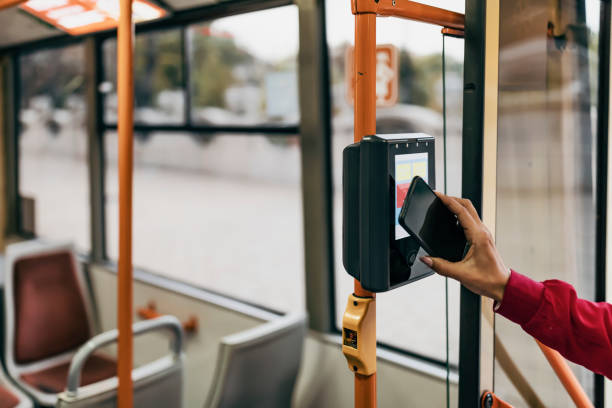
At their simplest, NFC tags are tiny tap points that store a small piece of information your phone can read. That “information” might be a web link, a contact card, a Wi‑Fi shortcut, or a small instruction for your device to follow. When you tap your phone near the tag, your phone energizes the tag and reads what it contains. The result feels like magic, but it’s mostly smart engineering focused on short range and clear user intent.
Most NFC tags are passive. That means there’s no battery inside. The tag waits quietly until it comes close enough to an NFC reader (like a phone or a payment terminal). The reader creates a small electromagnetic field; the tag uses a tiny bit of that energy to respond with its stored data.
If you’ve ever searched for near field communication tags, you were essentially searching for these passive tap points—often sold as stickers, cards, key fobs, or embedded labels.
NFC stickers: the same idea, different format
NFC stickers are usually just NFC tags packaged as adhesive labels. The “sticker” part is about how you place it in the real world. A sticker is ideal when you want to attach a tap point to an object or location: a device, a wall, a poster, a notebook, a product package, a donation box, or a desk.
When people search for near field communication stickers, they’re often looking for the fastest, easiest way to deploy NFC in a physical space. You don’t need special tools to mount a sticker. You peel, place, press, and test.
The key idea is this: an NFC sticker is still an NFC tag. What changes is durability, shape, and how it’s used. Some stickers are designed for indoor use, some survive rain and UV exposure, some are made for metal surfaces, and some are thin enough to disappear under a label without changing the look of your product.
NFC cards: why a card is more than “a tag with plastic”
An NFC card is also a form of NFC tag, but it’s built for handling, storage, and repeated use. Cards often show up in business contexts (membership, events, access control, loyalty), and in personal contexts (tap-to-share “digital business card” profiles).
When users search for a near field communication card, they often want a tap experience that looks professional and feels durable. Cards can be printed, branded, and carried. They can be handed to someone, kept in a wallet, or placed on a counter.
A card format has one big advantage: it creates a social interaction. A sticker is often for a location. A card is often for a person or an organization. The same tap action, but a different context and expectation. If a user taps a card, they expect the result to relate to the card’s owner, and to feel intentional.
NFC chip: what is inside, and why the term matters
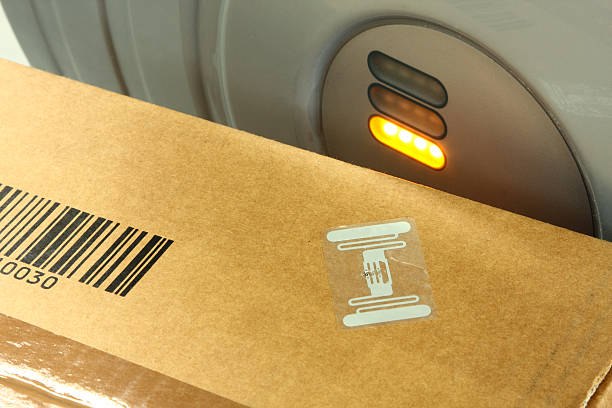
An NFC chip is the tiny electronic component that makes the tag work. The chip contains memory and logic for communication. The “tag” is the chip plus an antenna (a thin coil) and some packaging around it. The antenna is what captures energy from the reader and allows the chip to talk back.
So when someone says near field communication chip or NFC chip, they might mean one of three things:
They might mean the physical chip inside a tag.
They might mean a complete tag embedded inside an object.
They might mean the “tap capability” inside a phone, which is a different component.
For most shoppers and builders, it’s helpful to think this way: the chip is the brain, the antenna is the ears and mouth, and the sticker or card is the body you place in the world.
Why NFC tags feel so fast compared to other wireless connections
NFC is designed for a quick exchange, not a long relationship. That’s why tapping a tag often feels faster than pairing Bluetooth devices or connecting to Wi‑Fi. NFC doesn’t try to maintain a long connection. It tries to deliver a small payload (like a link or a token) and then end the interaction.
This “small and focused” design is why NFC works so well for moments like payments, ticketing, access, and tap-to-open actions. The user’s gesture is simple, and the system’s goal is clear.
If you’re designing an experience, remember that NFC does not replace your app, your website, or your backend. NFC is the doorway. The destination still needs to be good.
What NFC tags can store: small memory, big potential
One of the first surprises people have is that NFC tags usually store a small amount of data. Many common tags are designed to store short records rather than large files. That’s not a limitation if you design with it in mind.
Instead of trying to store everything on the tag, store a pointer to something bigger and updateable. A web link is the most common example. You can update the page over time without changing the physical tag. That makes NFC practical for instructions, onboarding, menus, product info, or donation pages.
When a tap leads to a fast, mobile-friendly page, users feel supported. When a tap leads to a slow or confusing page, users lose trust quickly. With NFC, the content quality matters as much as the hardware.
NFC writable tags: what “writable” really means
You’ll often see the phrase NFC writable tags. This generally means the tag’s memory can be written (programmed) with data using a phone or reader. Many tags are writable when new, and then can be locked to prevent changes later.
This matters because there are two different needs in the real world:
Sometimes you want a tag you can rewrite often—like a household automation tag where you keep experimenting.
Sometimes you want a tag that should never change—like a branded product label or an event pass.
Writable does not automatically mean “editable forever.” Many tags allow you to write new data until you lock them. After locking, they behave like a permanent label. That can be a safety feature for businesses, because it reduces the risk of accidental changes.
If you’re building for the public, locking can protect the integrity of what your tag does. If you’re building for personal use, leaving it writable can keep things flexible.
NFC tag types: why “type” is about compatibility, not just marketing
When people search for NFC tag types, they often want to know which tags will work with which phones. In practice, “tag type” can refer to multiple overlapping concepts: NFC Forum tag types, chip families, memory sizes, and feature sets.
For users and builders, the most important idea is compatibility. You want tags that most modern smartphones can read reliably, without requiring special apps. Tags that support common formats are easier for users. When a phone can recognize the tag and display a clear prompt, the experience feels trustworthy.
Some tags are optimized for simple link storage. Some are optimized for secure environments. Some are designed for special materials like metal. Some are made for harsh conditions.
If you’re not sure where to start, choose tags commonly used for tap-to-open links or digital business cards, test them on multiple devices, and then scale up.
NFC stickers vs NFC cards: how to choose the right format
This choice is less about technology and more about the moment you want to create.
Choose NFC stickers when the tap point belongs to a place or object.
A sticker on a machine can open instructions.
A sticker on a table can open a menu.
A sticker on packaging can open authenticity or support pages.
A sticker on a wall can open a check-in form.
Choose an NFC card when the tap point belongs to a person, membership, or portable identity.
A card can share a profile.
A card can represent access rights.
A card can hold a pass or membership reference.
A card can be branded and carried.
The best choice is the one that matches the user’s expectation. If the user sees a sticker on a product, they expect product info. If the user sees a card in someone’s hand, they expect identity or connection.
The best NFC experiences start with a clear promise
A tap is a moment of trust. The user is giving your tag their attention and their device. If they don’t understand what will happen after the tap, they will hesitate.
If you’re placing tags in public, give the user a clear promise: “Tap to see the menu,” “Tap to register,” “Tap to get support,” “Tap to confirm authenticity,” “Tap to donate,” “Tap to connect.”
This promise doesn’t have to be loud. It can be a small icon or a simple phrase. But it should exist. When NFC is invisible, clarity becomes even more important.
Where NFC tags are used today: real examples that make sense
NFC tags show up in more places than people realize, because they blend into objects.
In retail, a tap can open product details, reviews, or warranty registration.
In events, tags can speed up check-in and reduce lines.
In museums, tags can provide context without long labels.
In offices, tags can support access control and room booking.
In shipping and logistics, tags can identify assets and link to records.
In personal routines, tags can start a timer, open a checklist, or launch a workspace.
When you design these experiences, keep the user’s environment in mind. A user standing in a noisy store needs something quick. A user at home might enjoy deeper information. NFC allows both, because the tag can open a page that adapts to the moment.
Writing NFC tags: what you’re really writing
When you “write” a tag, you’re storing a record that the phone will interpret. A very common record is a URL. Another common record is a contact card. Another is a small instruction like “connect to this Wi‑Fi network” or “open this app.”
From the user’s perspective, the tag is not the goal. The goal is what happens after the tap. So when you write a tag, ask yourself: what is the simplest, most helpful outcome for the user?
If it’s a website, make sure the page loads fast and works on mobile.
If it’s a profile, make sure the page is easy to read and share.
If it’s instructions, make sure the first screen answers the first question.
NFC rewards simplicity.
NFC cards as digital business cards: why they work when done respectfully
Tap-to-share business cards can feel modern and smooth, but only if they respect the user. The best digital business card pages are lightweight, clear, and not intrusive. They provide the basics first, then allow deeper exploration.
A good NFC card experience usually includes a name, what the person does, and a simple way to connect. It might include social links and portfolio links, but it should not overwhelm.
If you force an app download for simple contact sharing, many users will bounce. A tap should not feel like a trap. It should feel like a shortcut.
NFC tag placement: the most common cause of “it doesn’t work”
If you want NFC to feel reliable, placement matters. NFC antennas in phones are not identical across models. Some phones read best near the top, some in the center. Users often do not know where their phone’s NFC sweet spot is, so you should design for forgiving placement.
Use larger tags when you can.
Give users a clear “tap area” on cards and stickers.
Avoid placing a tag where the user cannot comfortably tap.
If a tag is going on a product, put it where a person naturally holds the item. If a tag is on a wall, put it at a comfortable height. If a tag is on a counter, keep it away from metal clutter that can interfere.
A good NFC experience is physical design as much as digital design.
NFC on metal: why some tags fail and how to avoid it
Metal can interfere with NFC tags because it affects the magnetic field that powers the tag. This is why tags placed directly on metal surfaces can be unreliable unless they are specifically designed for it.
If you need to place NFC stickers on metal, look for tags described as “on-metal” or “anti-metal.” These tags often include a special layer that helps them function on challenging surfaces.
If you’re unsure, test before you deploy. A quick test can save you from printing a thousand labels that don’t work.
Durability: choosing between paper stickers, plastic tags, and rugged options
Not all NFC tags are built for the same environment. A thin paper sticker is fine indoors on a notebook. But it may not survive rain, heat, UV exposure, or repeated rubbing.
For outdoor use, choose more durable materials and adhesives. For industrial use, choose rugged tags. For wallets, choose cards designed to handle bending and friction.
Durability is not just about the tag surviving. It’s also about the user experience staying consistent. If a sticker peels at the edges, users may not trust it. If the printed label fades, users may not notice it. Physical quality builds digital trust.
NFC chips and memory size: how to choose without obsessing
People often shop for NFC tags by memory size. It’s understandable, but it can become a distraction.
If your main goal is to store a web link, most common tags are enough. A URL record doesn’t need much space. If you want to store multiple records, longer text, or complex structures, you might want more memory. If you want to store a big payload, you may be thinking about the wrong approach.
Most of the time, the better approach is: store a stable link to a page you control. Put your content on that page. Keep the tag simple. This approach is flexible, updateable, and easy for users.
Memory size matters more when you want the tag to function without internet access or when you need to store multiple data records. For many web-based experiences, it’s not the bottleneck.
NFC and security: how to design for trust
NFC tags can open links. Links can be good or bad. This is why trust matters.
If you are placing tags in public spaces, you should consider the risk of tampering. A malicious person could remove a tag and replace it. A sticker can be covered. A label can be swapped.
There are practical ways to reduce this risk: use strong adhesives, place tags where they are visible to staff, use tamper-evident designs, and make the destination page clearly branded so users know they landed in the right place. You can also educate users: “Always check the website name before entering information.”
Avoid designing NFC experiences that ask for sensitive data immediately after a tap. Build trust first, then request information when necessary.
NFC cards for access: a note about ethics and permission
NFC cards can be used in access control systems. That can be completely legitimate and helpful. It can also raise questions about copying or misuse.
If you are working with access systems, always do so with permission and within the rules of the organization. Don’t try to clone credentials you don’t own, and don’t experiment on systems you’re not authorized to test. NFC is a tool, and tools should be used responsibly.
This is not only a legal point; it’s a trust point. NFC works best when users feel safe.
Near field communication tags for products: the “always-there” help button
One of the most user-friendly uses of near field communication tags is product support. Imagine a product that always has a help button built into it. A user taps the product and instantly gets setup steps, troubleshooting tips, and the right contact options.
This is the opposite of making people search through generic support pages. It’s direct, contextual help.
If you build a product support tag, keep the destination page simple. Put the top three questions first. Add a short video if it helps. Provide clear next actions. If you can identify the product model from the tag or URL structure, do it so the user lands on the right version immediately.
A small tag can dramatically reduce frustration.
Near field communication stickers for events: smoother check-in and better flow
Events are a perfect NFC environment because time matters and people are moving. Near field communication stickers can be placed on signage, wristbands, passes, or entry points. A tap can check a person in, show them a schedule, share a map, or connect them to a support channel.
The best event NFC experiences are not heavy. They are fast. They give people what they need in the moment: directions, time, and clarity.
If you want people to tap, make it obvious. A subtle NFC logo and a simple “Tap for schedule” can increase usage. If the user doesn’t know the tag exists, it might as well not exist.
NFC stickers for donations: tap-to-give without friction
Donation systems work better when the action is easy. NFC can reduce friction by making the pathway to donate short and simple. A tap can open a donation page, show suggested amounts, and allow the user to complete a donation with a payment method they already use.
If you build donation tags, think about user confidence. People want to be sure they are donating to the correct place. The destination page should clearly show who the organization is, what the donation supports, and how the money is used. Keep it calm and transparent. Avoid aggressive popups. Make the page feel respectful.
NFC can make giving easier, but trust makes giving possible.
NFC in restaurants and hospitality: tap-to-menu, tap-to-pay, tap-to-review
In hospitality, every extra step feels like friction. NFC tags can open menus, start ordering, request service, and sometimes support payment flows.
If you use NFC for menus, keep them readable. Don’t force a PDF that takes forever to load. Use a mobile-friendly page with clear categories and legible text. If the user is standing in low light, large text matters.
If you use NFC for reviews, be respectful. Offer the option, don’t pressure. A calm “Tap to share feedback” works better than a desperate request. People can sense the difference.
NFC tag types in everyday shopping: what to look for
Let’s return to NFC tag types in a practical way. If you’re buying tags for general use with modern phones, you want the following qualities:
High compatibility with common smartphones.
Stable performance for tap-to-open link actions.
Good manufacturing quality so the antenna and chip are consistent.
A form factor that matches your surface and environment.
If you’re buying stickers, check adhesive quality and durability. If you’re buying cards, check thickness and whether they can be printed. If you’re placing tags on metal, choose on-metal options.
You don’t need to obsess over every technical specification to get a good result. Most NFC projects succeed or fail based on user experience and deployment choices, not based on tiny differences in tag memory.
NFC writable tags in teams: how to avoid chaos
In a team or organization, “writable” can become a management problem. If multiple people can rewrite tags, tags can drift over time and become inconsistent.
If a tag is meant to represent an official destination, lock it after you write it. If a tag is meant for internal experiments, label it clearly so people know it’s temporary.
A simple policy can prevent confusion: production tags are locked; test tags are writable. This keeps the system calm.
Troubleshooting NFC tags: a reliable checklist
When an NFC tag doesn’t behave as expected, the cause is usually one of these:
The phone’s NFC is disabled.
The tag is placed on a surface that interferes.
The tag is damaged or poorly manufactured.
The user is tapping in the wrong spot on their phone.
The destination page is slow or blocked.
The tag content is not written correctly.
Start by testing with a second phone. If two phones fail, suspect the tag or placement. If one phone works and another does not, suspect phone settings or compatibility. If the phone reads the tag but the destination is broken, the issue is your link or webpage.
Troubleshooting becomes easy when you separate “can the phone read the tag” from “does the destination work.”
NFC tags and mobile UX: the destination page is the real product
Because NFC is a doorway, the destination is where you either earn trust or lose it. A good destination page should load fast, be easy to understand, and provide a clear next step. If you’re linking to a website, optimize it for mobile. Keep the design calm. Don’t overwhelm the user with popups.
If your tag opens a “profile” page, make sure it communicates who you are. If your tag opens instructions, make sure it answers the first question immediately. If your tag opens a donation page, make sure it clearly shows legitimacy.
NFC is a moment of attention. Respect it.
NFC card design: small details that improve tap reliability
If you’re producing NFC cards, a few physical design choices can improve reliability. Place the NFC antenna area where a user naturally taps. Avoid printing heavy metallic inks directly over the antenna area if it interferes. Keep the card surface smooth and durable. Add a small “Tap here” marker that doesn’t look cluttered.
A card that looks premium but is confusing to use is not premium. The best design is a blend of beauty and clarity.
NFC sticker design: making the invisible visible
The biggest challenge with NFC stickers is that they can be invisible. If the user doesn’t know where to tap, they won’t tap.
Use a clear icon. Use a short phrase. Use consistent placement across your environment. If every table in a café has the tag in the same spot, users learn quickly. If tags appear randomly, users hesitate.
NFC adoption is often about repetition. The more predictable it is, the more natural it becomes.
Choosing between NFC stickers and QR codes: not a rivalry, a toolkit
Many projects work best when NFC and QR codes coexist. NFC is faster for those who can tap. QR is universal and visible. Some users prefer scanning, some prefer tapping. If you offer both, you can serve more people without adding much complexity.
The key is not to overload the design. Keep it clean: a single tap icon, a single QR code, and a single promise about what happens next.
NFC tags for learning and experiments: a smart first project
If you are new to NFC, start with a simple project: write a tag to open a specific webpage. Place it somewhere you’ll use it. Tap it daily. Notice what feels smooth and what feels annoying. That feedback is valuable.
Then try a second step: create a dedicated landing page for the tag, with one clear action. Make it fast. Make it readable. Make it helpful. Now you’re not just using NFC; you’re designing an experience.
That’s the skill that scales.
Building an NFC system you can trust
If you plan to deploy NFC tags at scale—across locations, products, or many users—you need consistency. Use the same tag type where possible. Use consistent placement. Use consistent destination page structure. Track what each tag is meant to do. Test with multiple phone models.
You don’t have to build a complex system on day one. You can start small: a handful of tags, a simple set of pages, a clear purpose. Then grow.
The most trustworthy systems are not the ones with the most features. They are the ones that behave predictably.
A calm recap: what you should remember
NFC tags are short-range tap points that store small data records.
NFC stickers are tags packaged as adhesive labels for objects and locations.
An NFC card is a tag packaged for portability and professional use.
An NFC chip is the component inside the tag that stores memory and logic.
NFC writable tags can be programmed and sometimes locked to prevent changes.
NFC tag types matter mainly for compatibility and deployment environment.
If you want NFC to feel “good,” focus on the full experience: clear promise, reliable placement, and a destination that is fast, readable, and helpful.
Final thoughts
NFC works because it respects the human moment. A tap is simple. The user’s intent is clear. The interaction is quick. That simplicity is powerful, but it only stays powerful when the experience stays trustworthy.
Whether you’re exploring near field communication tags for products, choosing near field communication stickers for a public space, designing an NFC card for your team, or learning about an NFC chip for a technical project, you can keep one guiding principle in mind: make the tap feel safe, useful, and honest.
At nfcing.com, our goal is clarity—so NFC feels like a helpful tool, not a confusing buzzword. If you want to explore deeper topics, look into tag placement best practices, on-metal solutions, durable formats, and how to build landing pages that turn a tap into real value for people.